
Introduction to Core Web Vitals
Imagine visiting a website that takes forever to load, or one where the content shifts suddenly while you’re trying to click a button. Frustrating, right? That’s exactly the kind of poor experience Google wants to prevent. That’s why it introduced Core Web Vitals.
Core Web Vitals are a set of specific website performance factors that Google considers important for the overall user experience. These signals help measure how fast and stable a page feels when someone visits it. Websites that provide a better experience are more likely to rank higher in search results.
Google uses hundreds of signals to decide how websites should rank. While content and backlinks still play a major role, the quality of the user experience has now become a major factor too. This is where Core Web Vitals come into play.
In this article, we will explore what Core Web Vitals are, how they affect your SEO rankings, how desktop and mobile versions differ, how SEO tools check them, and how to improve them for better performance and visibility.
The Three Metrics: LCP, FID, and CLS Explained
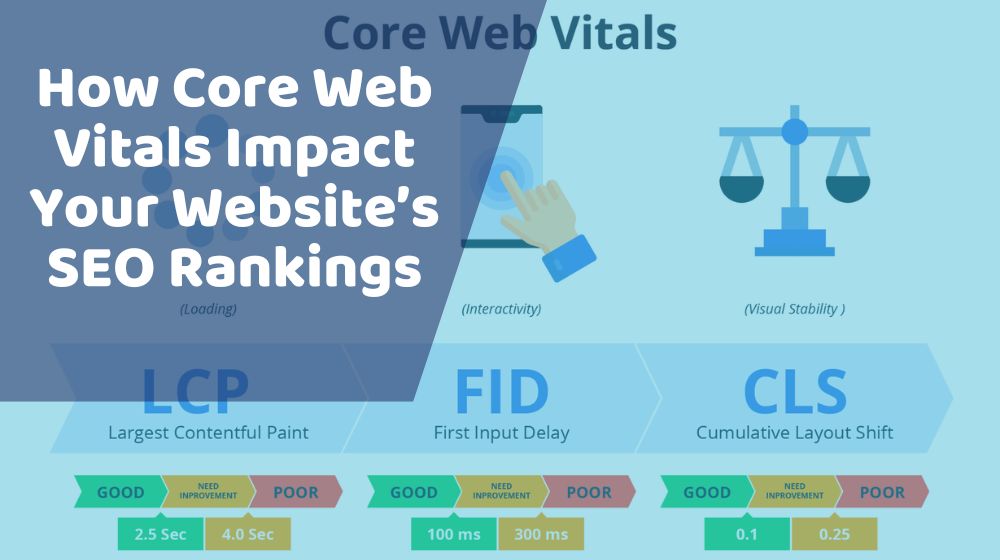
Core Web Vitals consist of three key metrics that focus on different parts of the user experience: loading speed, interactivity, and visual stability.
1. LCP (Largest Contentful Paint)
LCP measures how long it takes for the largest element on your page to load. This could be a large image, a block of text, or a video. A good LCP time is 2.5 seconds or less. If it takes longer than that, users might feel the site is slow.
Example: When you visit a blog, LCP could be the main image or headline. If it appears quickly, the page feels fast.
2. FID (First Input Delay)
FID measures how long it takes for the website to respond when someone first interacts with it. This could be clicking a link, tapping a button, or using a search bar. Google recommends an FID of 100 milliseconds or less.
Example: If you click on a button and the page reacts immediately, that’s a good FID. But if there’s a delay, it can be frustrating.
3. CLS (Cumulative Layout Shift)
CLS checks how stable your page layout is while it loads. If elements like images, buttons, or text move around as the page loads, that’s considered a bad experience. Google wants a CLS score of less than 0.1.
Example: You try to click on a button, but it moves and you end up clicking something else. That’s layout shift and can hurt your site’s performance.
Why Google Prioritizes Core Web Vitals
Google’s main goal is to help users find not just relevant content, but also enjoyable and smooth experiences. If a site loads slowly, responds poorly, or shifts around too much, visitors are likely to leave. This is called “bounce.”
When users leave quickly, it signals to Google that your site might not be meeting their needs. Over time, this can lower your rankings.
By focusing on Core Web Vitals, Google encourages website owners to create faster, more reliable, and user-friendly pages. This helps everyone—site owners get more traffic, and users get better experiences.
In short, better Core Web Vitals mean better chances to rank higher in search results.
Desktop vs. Mobile Core Web Vitals
Core Web Vitals are measured on both desktop and mobile devices. However, Google gives more weight to mobile performance in rankings because most users now browse the internet using phones or tablets.
Let’s look at how they differ:
Mobile
- Network issues: Mobile devices often rely on slower mobile networks.
- Device speed: Phones have less processing power than desktop computers.
- Touch interactions: Clicking on a small button on a phone is harder than using a mouse.
Desktop
- More stable: Desktop connections are usually faster and more reliable.
- Larger screens: Websites have more space to load elements.
- Better resources: Computers handle large files better.
Even if your website performs well on desktop, that doesn’t mean it will perform the same on mobile. That’s why it’s important to optimize for both platforms, especially mobile.
How Your SEO Analyzer Tool Checks These
SEO analyzer tools help you understand how well your website meets Google’s standards. Many tools now include Core Web Vitals reports. Here’s how they generally check them:
1. Page Speed Insights
Google’s own tool Page Speed Insights gives you a detailed report on LCP, FID, and CLS for both mobile and desktop. It also offers suggestions for improvement.
2. Lighthouse Report
Lighthouse is another tool that runs a series of tests on your site and provides scores for performance, accessibility, SEO, and more. It includes Core Web Vitals metrics.
3. Web Vitals Extensions
These browser extensions show you real-time Core Web Vitals scores as you browse your site.
4. Other SEO Audit Tools
Popular SEO tools like Semrush, Ahrefs, and Screaming Frog are also starting to include Core Web Vitals in their website audits.
These tools fetch data from your site and give you both lab data (from a simulated test) and field data (from real users). You can then fix problems based on their recommendations.
Actionable Tips to Improve Each Metric
Improving Core Web Vitals might sound technical, but there are simple steps you can take even if you’re not a developer.
How to Improve LCP
- Use a fast hosting service: A good server response time can make a big difference.
- Optimize images: Properly Optimized Images are of compressed formats like WebP or JPEG and size them correctly.
- Use lazy loading: Load images only when they are about to appear on the screen.
- Minimize CSS and JavaScript files: Clean code loads faster.
How to Improve FID
- Reduce JavaScript: Avoid long JavaScript tasks that delay interactivity.
- Use browser caching: This helps the site load faster on repeat visits.
- Split long tasks: Break up heavy scripts so they don’t block user interaction.
- Load only necessary scripts: Remove third-party scripts you don’t need.
How to Improve CLS
- Always set image sizes: This prevents shifting when images load.
- Reserve space for ads: Make sure ads don’t push content down.
- Avoid inserting content above existing text: Especially during loading.
- Use fonts wisely: Use fonts that don’t change layout when they load.
Improving these metrics may take some effort, but the result is a website that feels smooth, fast, and stable—something both users and search engines love.
Conclusion: Making Core Web Vitals Part of Your SEO Strategy
SEO is no longer just about using the right keywords or having backlinks. The way your website loads, behaves, and feels to users now plays a major role in where it ranks on search engines.
By focusing on Core Web Vitals, you’re not only meeting Google’s expectations but also building a site that your visitors will enjoy using. A better user experience leads to more time on site, more engagement, and better conversions.
Here’s a quick recap of what you should do:
- Understand the three Core Web Vitals: LCP, FID, and CLS.
- Regularly check your website’s performance using trusted SEO tools.
- Optimize your site for both desktop and mobile users.
- Apply simple fixes to improve loading, interactivity, and visual stability.
Making Core Web Vitals part of your SEO plan is not just a trend—it’s a long-term strategy for success. The sooner you start improving them, the better your chances of climbing higher in search rankings and keeping visitors happy. To get The Better Experience for Technical SEO use our SEO analyzer to Get complete idea about your Technical SEO for your Website
